기본 콘텐츠로 건너뛰기

Cooperation Tools That Support Scrum Development Process

We have to cooperate for our project, and we need to decide which tool to use.
One of our mentors recommended 3 cooperation tools which support scrum board function, and suggested we learn about that tools, put into shape, and share them one another.
So, to follow his order, I write this post.
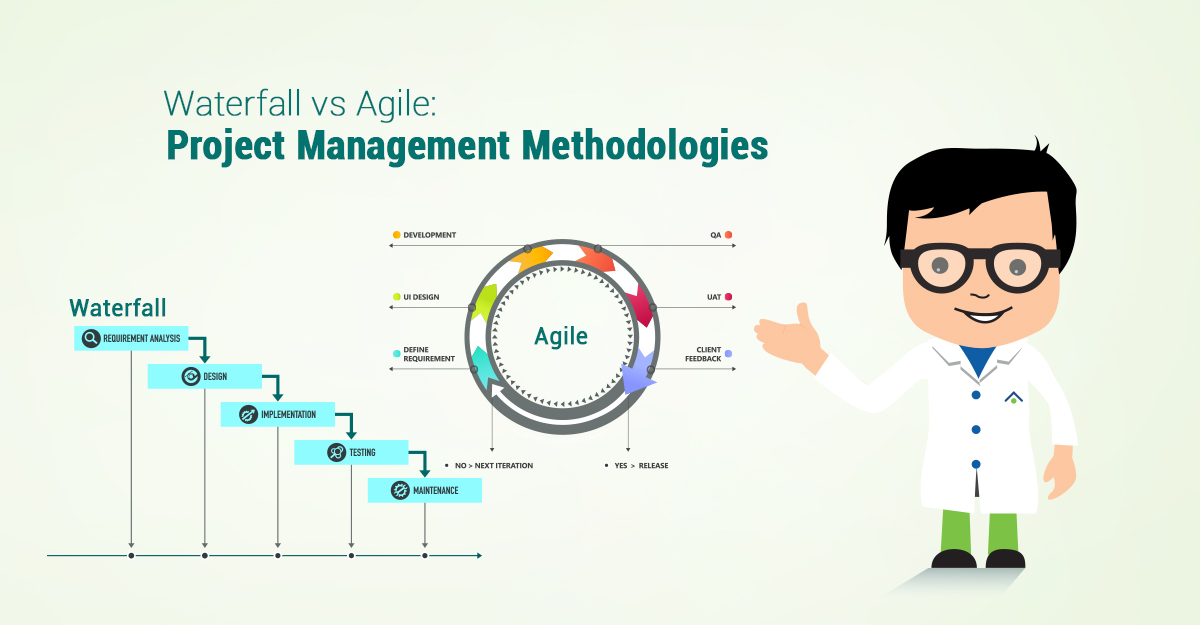
Scrum - Agile Software Development Process

First of all, we should know what the hell the SCRUM is. I referred here and wiki.
In agile software development process, there are 3 elements that consist of it - roles, artifacts, workflow.

Roles

Product Owner

They ponder on what they make.

Scrum Master

They ponder on how they make.

Scrum Team

They just make T_T

Artifacts

Product Backlog

It contains general requirements. (I don't sure it is right explanation for product backlog.)

User Stories

It contains detail requirements.

Estimates

It contains the order of priority of all requirements(user stories).

Workflow

Iteration & Incremental Development

In Agile Process, we install waterwheel at the bottom of the traditional waterfall model, which means we don't do the whole task in one iteration, but we split the task in many prototypes, and develop each prototype iteratively and incrementally.

Sprint Meeting

A sprint means a small group of the tasks that has a due date to complete. 
In Scrum, the plan of software development is built up with considering a sprint as an atomic element. 
We should have Sprint meeting with daily periods, and should classify sprints into 3 categories(todo, in progress, done), so that we can manage our tasks with high efficiency.

Software Development Management Tools

From now on, I'll introduce you some tools that can help our software development management with Scrum software development process.

JIRA

Pros

  • There are so many functions.
    • Notification with email.
    • Real-time information about issues is supported.
    • Able to customize.
    • Plugin Extension.
  • Both online hosting service and server installation version are supported.

Cons

  • It's not free. 
    • If there are less or equal than 10 members, it costs total $10.
    • If there are more than 10 memebers, it costs $7 per a person.
  • There are too many functions.

Trello

Pros

  • Free.
  • It's easy to use.
    • Its card interface is so intuitive.
  • High quality mobile client is supported.

Cons

  • It's hard to manage when the number of cards increases.
    • It's inappropriate for complex and gigantic projects.
  • It doesn't provide Gantt chart.
  • It only supports server installation version. (No online hosting service)

Other Tools

 Excel(...), Github Projects, Asana, Redmine, ...

댓글

  1. Is there any tools offering Gantt chart only?

    답글삭제
    답글
    1. You may be able to find your answer here.
      http://blog.capterra.com/6-of-the-best-gantt-chart-software/

      삭제

댓글 쓰기

이 블로그의 인기 게시물

The reason why I selected Google Blogger

In SW Maestro, 3 mentors for our team are fixed, and we got our first official mentoring from mentor 배권한. He gave us an assignment - make a personal blog and post an article about co-working tools. He insisted we run a blog for 4 reasons. We forget what we have studied someday We can realize something new when we think about it again Somebody like a headhunter may contact me through my blog To make my activities visible So, I decided to make a post about pros and cons of famous blog services. Criteria of Selection I consider these factors. Main Factors It should 'work' well. It should be easy to parse my posts from the blog. It should be easy to write code on my blog. It must take responsive design, so that it can be seen with mobile device. It must be easy to be exposed by Google search. It must provide reply function. Sub Factors It is good if the design is fine. It is good if the markdown function is...

Neural Network [cs231n - week 3 : Loss Functions and Optimization]

The purpose of this post is to summarize the content of cs231n lecture for me, so it could be a little bit unkind for people who didn’t watch the video . In addition, I omitted some contents that I don’t think it’s important enough, so use this article as just an assistance. Loss Function Below is the general numerical expression of loss functions. Multiclass SVM Loss There are many many many kinds of loss functions, but this class only deals with two of them : SVM loss and softmax . Above is the expression of SVM loss function. Meaning of the expression is, that score of the correct class should be larger at least one comparing to scores of the others to make the loss zero. It is more easier to understand it with an example. First, get each loss of the class like the image above. I'm not omitting the explanation because it's annoying to write. It's because explanation of the lecture slide is kind enough. And then, get the loss by calculating the mean va...

Running Anaconda Python on Jupyter Notebook with Docker in Windows

I think there is no IDE more suitable for studying machine learning or deep learning with Python than Jupyter Notebook. However, it is so difficult to construct a Jupyter environment without crushing with the existing Python environment. So, I decided to make an only-for-deep-learning environment in the Ubuntu Docker container to avoid all annoyance. I will assume that you already installed Docker. Environment Ubuntu 17.04 LTS Anaconda 5.0.0 (containing Python 3.6) Creating Docker Container First of all, we are going to create a Docker container. The world is going better day after day! You can get a Docker image containing Anaconda that someone created and simultaneously make a container with the image you just downloaded just with this one-line command. docker run - it --name jupyter -p 8000:8000 --volume /c/Users/jinai/Dropbox/HaveToLearnToRun/CSE/3_1_MachineLearning/jupyter_workspace:/root/jupyter_workspace continuumio/anaconda3 /bin/bash It’s quite complex. So let m...